Updated: July 23, 2026
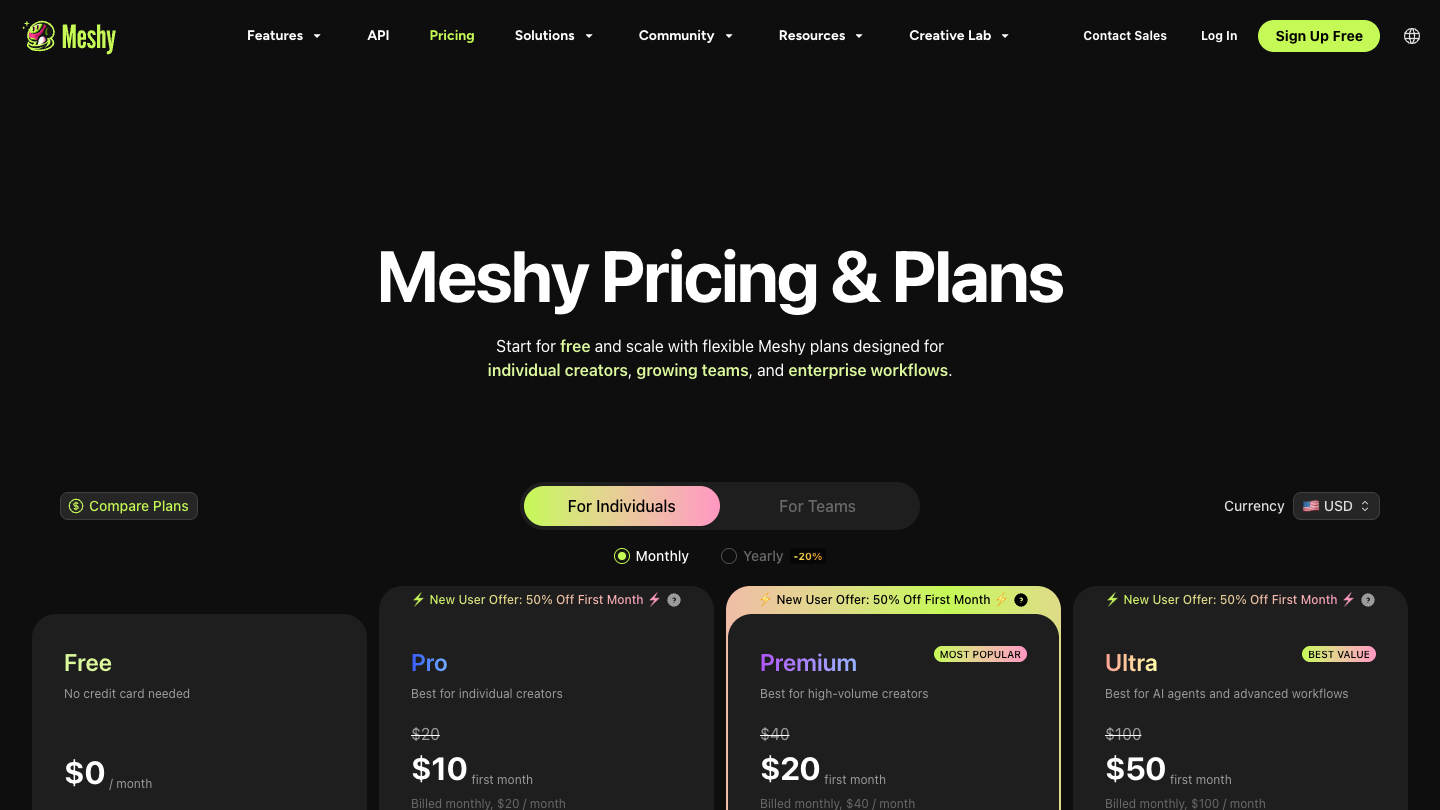
Pricing basis: Meshy's official Help Center, pricing page, web-app documentation, and API documentation. Prices below are USD monthly list prices from the current Help Center plan guide. Taxes, regional pricing, promotions, and checkout totals can differ.
Quick Answer
Most individuals should start with Free, then move to Pro only when they need to download Meshy 6 models, use private licensing, access the API, or work with more monthly credits. Premium and Ultra are capacity upgrades, not proof of better results. Studio is a team plan at $60 per seat per month with a two-seat minimum, so its practical starting cost is $120 per month.
The main pricing trap is not a surprise fee. It is paying for generation volume before you know how many outputs survive your review and cleanup process.
Current Meshy Pricing
Meshy's newer official plan guide lists four individual plans and two team plans:
| Plan | Current monthly price | Monthly credits | Best starting fit | Main buying caution |
|---|---|---|---|---|
| Free | $0 | 100 | Testing the interface and generation direction | Only 10 Meshy 5 downloads per month; Meshy 6 output cannot be downloaded on Free |
| Pro | $20 | 1,000 | Solo creators who need downloads, private licensing, multi-view, or API access | Upgrade only after the workflow shows value |
| Premium | $40 | 3,000 | Individuals who consistently exceed Pro's capacity | More credits do not guarantee more accepted assets |
| Ultra | $100 | 10,000 | High-volume individual use | Large recurring commitment without team collaboration |
| Studio | $60 per seat | 4,000 per seat | Teams that need a shared workspace and credit pool | Two-seat minimum creates a $120/month starting floor |
| Enterprise | Custom | Custom | Organizations needing negotiated scale, SSO, retention, or dedicated support | Requires a sales conversation; no public flat price |
Source: Meshy's current official plan guide, checked July 23, 2026.
A note about conflicting official pricing copy
The FAQ on Meshy's main pricing page still describes an older four-plan lineup—Free, Pro, Studio, and Enterprise. The newer Help Center guide adds Premium and Ultra, classifies Studio as a team plan, and states that Studio requires at least two seats.
This page follows the newer, more specific Help Center guide. Confirm the selected plan and final checkout total before paying. Annual prices are not included here because the current plan guide did not state them.
Free vs Paid: What Can You Actually Validate?
Free is enough to judge direction
Free includes 100 monthly credits and requires no card according to Meshy's official documentation. That is enough to inspect the interface, try representative inputs, and decide whether the generated direction is promising.
It is not a complete latest-model trial. Meshy's current Free-plan guide says Free users can generate Meshy 6 models but cannot download them. Free downloads are limited to 10 Meshy 5 models per month.
Use Free to answer:
- Does image-to-3D or text-to-3D fit the way you begin a project?
- Do the previews look promising enough to justify an export test?
- Are you willing to inspect and clean up generated geometry?
Do not use Free alone to answer:
- Does a Meshy 6 model import correctly into my downstream tools?
- How much cleanup does the latest output need?
- Is the paid workflow economical at my real acceptance rate?
Pro is the first practical solo plan
Pro is $20 per month with 1,000 monthly credits. The current plan guide also lists unlimited model downloads, API access, multi-view Image-to-3D, private and CC BY 4.0 asset options, and 10 queued tasks.
The upgrade makes sense when one of those capabilities removes a current blocker. "I want more credits" is weaker evidence than "I need to export the Meshy 6 result I already reviewed" or "I need the private-license path for this project."
Which Meshy Plan Should You Choose?
Choose Free if you are still testing the category
Start here if you do not yet know whether generated 3D belongs in your workflow. Use several representative inputs, not one showcase-friendly image.
Stop condition: If the previews repeatedly fail on the shapes or viewpoints that matter, more credits will not solve the fit problem.
Choose Pro if export, rights, or API access is the blocker
Pro is the sensible first paid plan for most individuals. It unlocks the capabilities that turn an in-app experiment into a broader workflow.
Upgrade condition: You have already found promising outputs and can name the paid capability you need next.
Choose Premium if Pro's monthly capacity is proven to be too small
Premium triples the listed monthly credits from 1,000 to 3,000 for twice the monthly price.
That arithmetic is attractive only after tracking accepted outputs. If most generations are rejected, a larger allowance may increase experimentation without improving cost per usable asset.
Choose Ultra for sustained individual volume
Ultra lists 10,000 monthly credits at $100. It is for an individual workflow with recurring, demonstrated demand—not for discovering whether Meshy is useful.
Before upgrading, compare the cost with Studio if collaboration has become part of the problem.
Choose Studio when the shared workspace has operational value
Studio is $60 per seat per month, requires at least two seats, and allocates 4,000 credits per seat into a shared team pool according to Meshy's Help Center.
The effective starting price is therefore $120 per month. Choose it when shared assets, team management, and centralized work reduce real coordination cost. A solo user who only needs more volume should compare Premium or Ultra instead.
Choose Enterprise only for requirements the public plans do not meet
Enterprise is the appropriate conversation when SAML SSO, multiple workspaces, custom credit allocation, API asset retention, higher throughput, procurement, or dedicated support is mandatory.
Do not infer a price from the self-serve tiers. Ask sales for a written quote and confirm retention, support, security, and overage terms.
Credits: The Number That Needs Context
Meshy's current web-app credit guide says a full Meshy 6 Text-to-3D or Image-to-3D generation uses 20 credits. Its API pricing is more granular: for example, the official API page lists Meshy 6 Image-to-3D at 20 credits without texture and 30 credits with texture.
These are different surfaces and task definitions. Do not divide a monthly allowance by one headline cost and treat the result as a guaranteed model count.
Track:
- Credits spent.
- Outputs accepted for further work.
- Cleanup time per accepted output.
- Final assets delivered or printed.
The useful metric is cost per accepted asset, not cost per generation.
Limits and Hidden Costs
Monthly credits do not roll over
Meshy's current plan guide says subscription credits reset monthly. Uneven workloads can therefore make a larger plan inefficient even when its price per listed credit looks better.
Free has a latest-model export gap
The inability to download Meshy 6 models on Free pushes a serious export test into a paid plan. Budget for at least one paid month if your decision requires a complete latest-model handoff.
Studio starts at two seats
The displayed $60 price is per seat, not the total team price. The minimum two-seat purchase matters more than the headline number.
API work has its own credit logic
API operations have task-specific credit costs, and rate limits are applied at the account level across API keys. Validate API economics with a small production-shaped sample before automating a high-volume pipeline.
Licensing changes by plan
Meshy says Free outputs use CC BY 4.0, allowing commercial use with attribution. Paid customers receive the private/commercial ownership position described in Meshy's terms, provided their inputs do not infringe third-party rights.
This is a buying factor, not legal advice. Review the current terms for the actual project.
Official sources are not fully synchronized
Meshy's newer Help Center and older pricing FAQ currently disagree on plan structure, and official pages conflict on whether Free accounts can buy extra credits. Because the current sources do not settle the question, this page does not claim that Free accounts can buy top-ups.
Meshy Pricing vs Alternatives
| Option | Verified starting point | Best reason to compare | Cost caution |
|---|---|---|---|
| Meshy | Free; Pro $20/month | Broad hosted workflow and a low first paid tier | Free cannot download Meshy 6; plan credits reset |
| Tripo | Free; Pro $19.90 regular monthly price or $167.16/year | Another hosted workflow with a larger stated Pro credit allowance | Tripo credits are not equivalent to Meshy credits |
| Hyper3D Rodin | Free; Creator $30/month or $288/year | Pay-by-result preview model and a separate Business API tier | Higher creator entry price; accepted-output economics remain untested |
| TRELLIS.2 | No subscription price in the official repository | Local image-to-3D control under the MIT License | Requires Linux and an NVIDIA GPU with at least 24 GB of memory |
Competitor prices were checked on official sources on July 23, 2026. See the Meshy alternatives guide for fit and switching logic.
Recommendation
Use this buying sequence:
- Start on Free with three representative inputs.
- If previews are promising, buy the shortest commitment needed to export Meshy 6 and test the downstream workflow.
- Stay on Pro until your own usage log—not the plan table—shows that monthly capacity is the bottleneck.
- Move to Premium or Ultra for proven individual volume.
- Choose Studio only when at least two people need the shared workspace.
Check the current Meshy checkout after reviewing the plan guide and live total.
Affiliate disclosure: This page may earn a commission if you use the Meshy product link. Pricing evidence links go directly to official sources.
Read the research-based Meshy review before paying if you have not yet tested workflow fit.
FAQ
What is the cheapest paid Meshy plan?
The current Help Center lists Pro at $20 per month. Time-limited promotions and regional offers are excluded from this answer.
Does Meshy Free let me download Meshy 6 models?
No. Meshy's current Free-plan guide says Meshy 6 models can be generated but not downloaded on Free. Free users can download up to 10 Meshy 5 models per month.
Is Studio really $60 per month?
Studio is $60 per seat per month with a two-seat minimum. The effective starting subscription is therefore $120 per month before taxes or other charges.
Do Meshy credits roll over?
Monthly subscription credits do not roll over, according to the current plan guide. Purchased credit packs are treated separately, but official pages conflict on whether Free users can buy them.
Does a higher plan improve model quality?
The current plan guide mainly differentiates individual tiers by monthly credits and capacity. Do not assume that paying for Premium or Ultra improves the underlying result unless the selected feature or model explicitly says so.
Does Meshy pricing include API access?
The current plan guide lists API access for Pro, Premium, Ultra, Studio, and Enterprise, but not Free. API tasks have their own credit schedule and account-level rate limits.